Incognito Casino Mobile App โ€” Full Platform Access from Your Phone

The Incognito Casino app brings the full platform to your phone - 3,000 plus slots, live dealer tables, sports betting and GBP payments, all in a touch-optimised interface. Whether you prefer a native app on Android or iOS, or simply add the site to your home screen, the experience mirrors the desktop version without compromise. Sessions stay stable, bonuses track in real time, and deposits take seconds.
ยฃ20 deposit ยท welcome reward
Join Nowwith bonus

Why Mobile Gaming Matters at Incognito Casino

Stability and speed define a good mobile casino experience. Incognito Casino launched in 2024 with mobile-first architecture: pages load fast on 4G and Wi-Fi, live streams adapt to your connection quality automatically, and the cashier works as smoothly on a 6-inch screen as it does on a laptop.

The practical difference you feel immediately: bonus progress updates live, you can switch from a slot to a live blackjack table without reloading, and the withdrawal button sits one tap away in the top panel.

For UK players, the GBP account means no conversion friction - your balance shows in pounds, deposits land in pounds, and you withdraw in pounds.

Open Account

What the Mobile Version Offers

Before downloading anything, it helps to know what is actually inside the app versus what stays browser-only. At Incognito Casino, the mobile version carries the full feature set:

  • 3,000 plus slots including Buy Features, Drops and Wins, and Classic Corner categories
  • 300 plus live tables from Evolution and Pragmatic Play Live in HD
  • Full sportsbook covering 55 sports and around 1,300 events daily
  • GBP cashier: Visa, Mastercard, Skrill, Neteller, Apple Pay, Google Pay, Bitcoin and other crypto
  • Real-time bonus tracking and wagering progress in My Account
  • Deposit and withdrawal requests, including crypto payouts in 0-30 minutes after KYC
  • Responsible gambling tools: session limits, loss limits, self-exclusion from the Limits tab
  • 24/7 live chat and Telegram support

Security carries over completely: 256-bit SSL encryption, tokenised card data, 2FA login, and certified RNG across all providers.

โœ“

Apple Pay and Google Pay are available in the mobile cashier, which makes one-tap deposits practical for most UK players without entering card details manually each time.

Android Installation: APK and Permissions

Incognito Casino offers a dedicated Android app. Because the APK is distributed outside the Google Play Store, you need to allow installation from unknown sources before the file will run.

Step-by-step for Android:

  1. Visit the Incognito Casino site from your Android browser and navigate to the app download section.
  2. Tap the Android download button. Your browser will save the APK file.
  3. Open your device Settings, go to Security or Privacy, and enable 'Install from Unknown Sources' (on Android 8 and above this prompt appears automatically when you open the APK).
  4. Locate the downloaded file in your Downloads folder and tap to install.
  5. Once installed, open the app, log in with your existing credentials or register a new account.

Common installation errors:

  • 'App not installed' message: usually means a previous version is still on the device - uninstall it first, then retry.
  • The APK download is blocked by your browser's built-in protection: switch to Chrome or Firefox and try again.
  • Insufficient storage: the app needs at least 100MB free; clear cache from older apps if needed.
Get the App

How to Download the App

The download page is accessible directly from the Incognito Casino homepage. Look for the mobile section or app banner in the footer or main navigation.

For Android users: the button leads to the APK file hosted on the casino's own domain, which means the file is always the current release. No third-party mirrors.

For iOS users: Apple's App Store policies restrict real-money gambling apps in some regions. Incognito Casino addresses this with a Progressive Web App (PWA) approach - the full site functions as an app when added to your iPhone home screen via Safari.

Adding to iPhone home screen:

  1. Open the Incognito Casino site in Safari.
  2. Tap the Share icon (the box with an arrow).
  3. Scroll down and tap 'Add to Home Screen'.
  4. Confirm the name and tap Add.

The icon appears on your home screen and opens the casino in full-screen mode without browser toolbars, behaving like a native app.

For desktop Chrome: click the Install icon next to the address bar (or find it under the browser menu) and the shortcut appears in your Start menu or taskbar.

System Requirements

The app and PWA are lightweight by design. Here is what you need:

Platform Minimum Requirement
Android OS 7.0 and above
iOS 13.0 and above (Safari PWA)
RAM 2 GB recommended
Storage 100 MB free for Android APK
Connection Stable 4G or Wi-Fi (live tables need at least 5 Mbps)
Browsers Safari, Chrome, Firefox, Opera, Mozilla

Live casino streams adapt quality automatically, so a slightly slower connection will reduce resolution rather than cut the feed entirely.

Registering Through the App

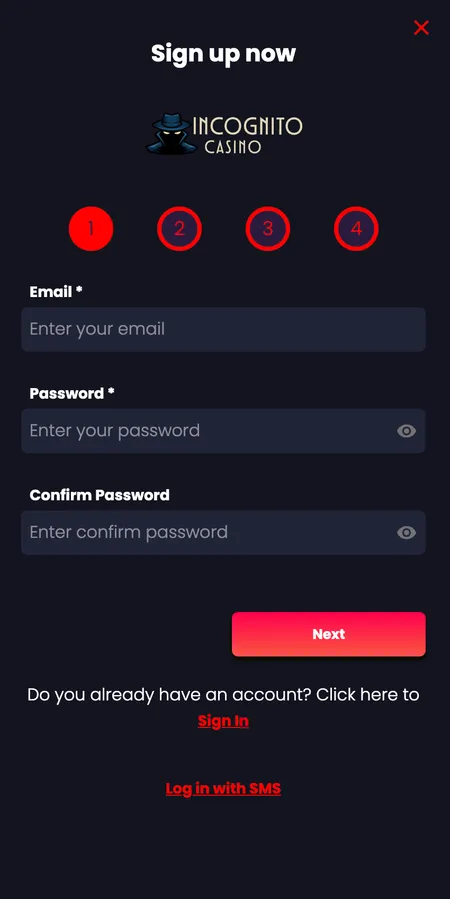
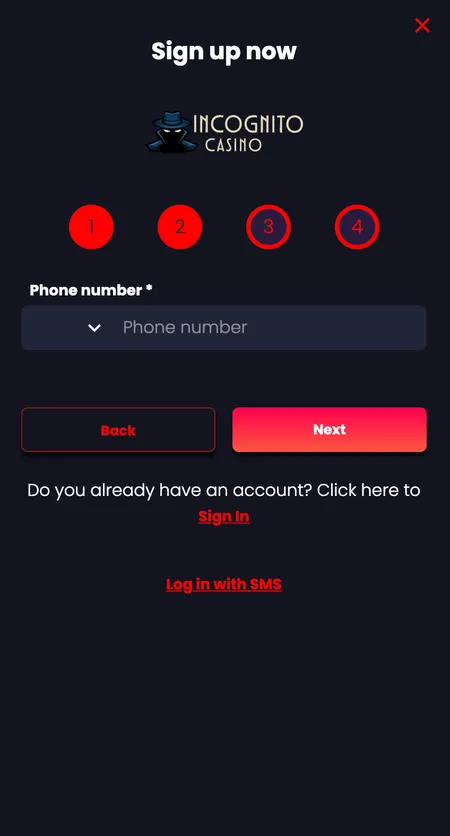
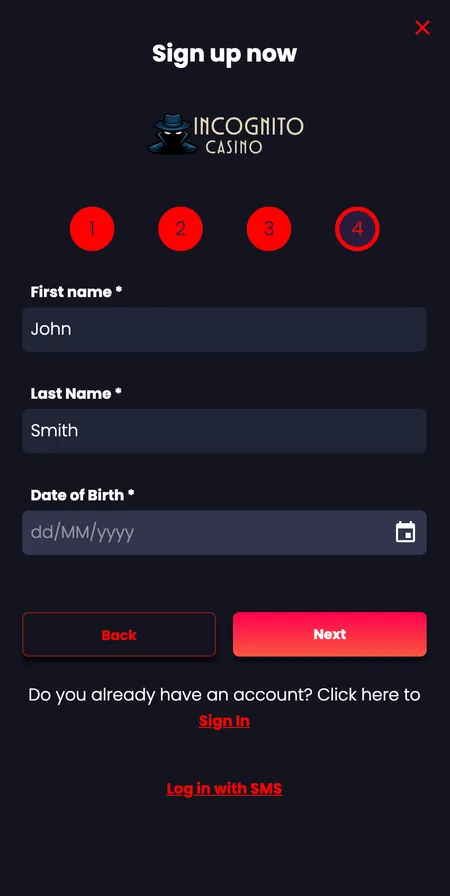
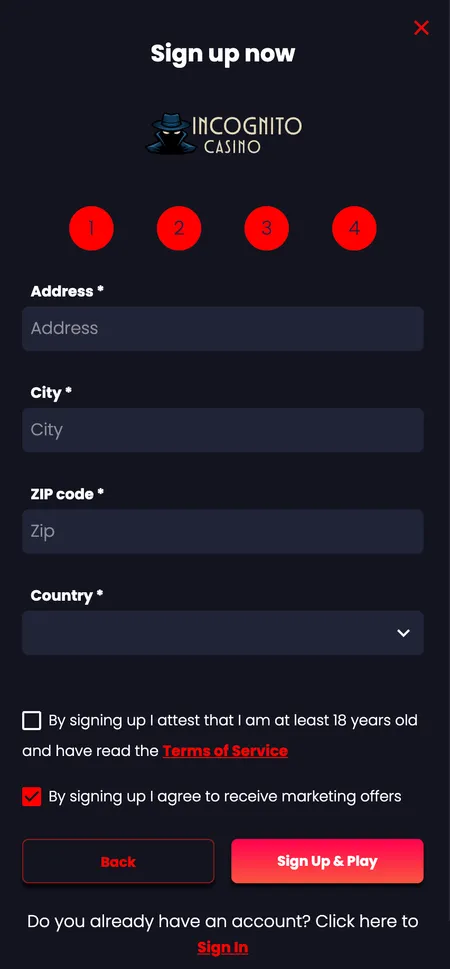
New players can complete the full sign-up process inside the app. The registration form follows the same four-step flow as the desktop site:

  1. Enter your email address, set a password and confirm it.
  2. Add your phone number for SMS verification.
  3. Fill in your name and date of birth.
  4. Provide your address, select GBP as your account currency, and accept the terms.

The minimum age is 18. After submitting, verify your email or phone to activate the account. You can then head straight to the cashier and make a first deposit from 20 GBP to unlock the welcome bonus.

If you already have a desktop account, the same login works in the app immediately.

Registration Steps in the App

  1. App registration: email and password step

    Step 1: Enter your email address, choose a secure password and confirm it before moving forward.

  2. App registration: phone number entry

    Step 2: Enter your mobile number. The casino sends an SMS code to verify your contact details.

  3. App registration: personal details form

    Step 3: Provide your first name, last name and date of birth. This information is required for KYC.

  4. App registration: address and terms acceptance

    Step 4: Add your address, confirm your country and tick the consent boxes to complete sign-up.

Register Now

Bonuses Available in the App

All bonuses available on desktop are accessible from the mobile app without restriction. The welcome package - Triple Thrill - covers three deposits:

Deposit Bonus Max Bonus
1st deposit 100% match up to 500 EUR
2nd deposit 150% match up to 500 EUR
3rd deposit 200% match up to 500 EUR

Minimum deposit per stage is 20 EUR. Wagering requirement: 35x the bonus amount. Maximum bet with active bonus funds is 5 EUR per spin. Bonus buys are not permitted while bonus funds are active. Maximum withdrawal from bonus winnings is 2,000 EUR.

The Promotions tab in the app also shows rotating offers including the Mystery Clash weekly slot tournament (7,000 EUR prize pool, 250 places), reload bonuses, the Secret Missions series, and weekly cashback. For existing players, checking the Promotions section after each login is worthwhile since time-limited offers appear there first.

The 250 free spins bonus triggers on a deposit of 25 EUR or more - claim via the Promotions tab before or immediately after funding your account.

Sports Betting and Live Casino on Mobile

The sportsbook covers 55 sports with roughly 1,300 events available daily. Pre-match and in-play betting both work through the mobile interface. Odds display in standard UK decimal or fractional formats. Football, rugby, cricket, NHL, NBA, volleyball and hockey are among the most active markets.

For live casino, the app streams HD video from Evolution and Pragmatic Play Live studios. Tables include VIP Blackjack, No Commission Baccarat, Gravity Roulette and over 300 live game variants. The live chat with dealers is accessible from the game window.

Stakes in live blackjack range up to 3,000 EUR per round, and game show titles handle lower casual bets alongside high-roller formats.

Book of Dead slot
Book of Dead
Play'n GO
Play
Hell Hot 100 slot
Hell Hot 100
Pragmatic Play
Play
Thunder Crown slot
Thunder Crown
NetEnt
Play
Book of Abyss slot
Book of Abyss
Available in app
Play
Queen of Beasts slot
Queen of Beasts
Available in app
Play
Kongs Jungle Tower slot
Kongs Jungle Tower
Available in app
Play

Login, Profile and Security Settings

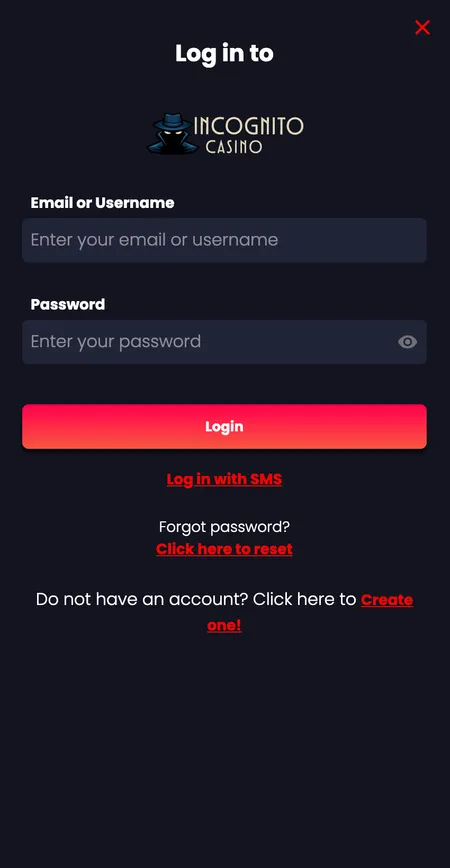
Logging into the app uses the same credentials as the desktop: your registered email or username plus your password. SMS login is also supported for faster access on mobile.

Two-factor authentication (2FA) is available and recommended. Activate it in your account security settings - each login will then require a one-time code from your authenticator app or SMS in addition to your password.

The My Account panel in the app gives you access to:

  • Live balance in GBP
  • Betting history and transaction log
  • Wagering progress tracker for active bonuses
  • Deposit, loss and session limits
  • Withdrawal request status
  • Self-exclusion controls
Incognito Casino app login form

The login screen with email or username field, password entry and the option to enable 2FA for extra account security.

Log In to Your Account

App Updates and Reinstallation

The Android APK updates outside the Play Store, so automatic updates depend on the app's internal update checker or manual reinstallation from the site.

To update the Android app:

  1. Visit the casino site in your browser.
  2. Download the latest APK version.
  3. Install over the existing app - your account data and preferences are stored server-side and will not be lost.

For iOS PWA users, the site updates automatically since the PWA loads from the server on each session. No reinstallation is ever needed.

If the app stops working after a phone OS update, uninstalling and reinstalling the APK usually resolves the issue. Contact support via live chat if problems persist - the team is available 24/7.

Mobile Payments: Deposits and Withdrawals

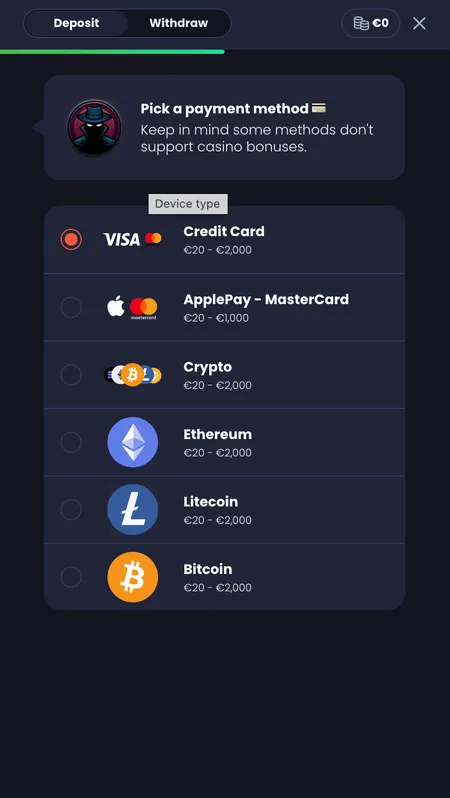
The cashier inside the app supports the same payment range as the desktop platform:

Method Min Deposit Min Withdrawal Withdrawal Speed
Visa / Mastercard / Maestro 20 EUR 100 EUR 2-5 working days
Skrill / Neteller 20 EUR 100 EUR About 1 working day
Bank Transfer 50 EUR 100 EUR 3-5 working days
Bitcoin / crypto 20 EUR 100 EUR 0-30 minutes
Ethereum 40 EUR 100 EUR 0-30 minutes

No withdrawal fees apply to any method. Daily withdrawal limit is 4,000 EUR, weekly 10,000 EUR, monthly 20,000 EUR. Crypto is the fastest option after KYC is cleared - payouts typically process within 30 minutes.

Deposits land instantly in most cases. If a deposit takes more than 10 minutes to appear, send a payment confirmation screenshot through the support chat.

Mobile cashier payment method selection

The deposit screen in the mobile cashier showing available payment methods including cards, e-wallets and crypto options.

App Security: Encryption and Session Safety

The app uses 256-bit SSL encryption for all data in transit. Card details are tokenised rather than stored in plain text on the platform's servers. The RNG powering all slot and live dealer outcomes is independently certified by third-party testing laboratories.

AML procedures meet EU standards, and the Curaรงao Gaming Control Board (licence OGL/2024/1788/1030) oversees the platform's compliance. Sessions auto-expire after inactivity. If you log out and log back in from a new device, the 2FA prompt adds a second layer of identity confirmation before access is granted.

VIP players receive priority in the withdrawal queue, which applies to mobile-initiated requests too. The Incognito Casino home page has more detail on the platform's overall security architecture.

For responsible gambling, the Limits tab inside My Account lets you set daily, weekly or monthly deposit caps, session reminders and self-exclusion - all manageable without contacting support.

โœ•

Bonus funds cannot be used for feature buys (bonus buy slots). If your bonus balance drops below 0.10 EUR, the bonus is automatically cancelled. Check wagering progress in My Account before placing larger bets.

Incognito Casino App - Common Questions

Is there a dedicated app for iPhone?

Incognito Casino does not currently offer a native iOS app through the App Store. iPhone users can add the site to their home screen via Safari (Share button, then 'Add to Home Screen'), which creates a full-screen shortcut that behaves like a native app.

Where do I download the Android APK?

The APK is available directly from the casino site. Visit the mobile or app section of the site from your Android browser, tap the download button, allow installations from unknown sources in your device settings, and run the downloaded file.

Will my account work on both mobile and desktop?

Yes. Your account, balance, bonus progress and transaction history are stored server-side. Logging in on any device shows the same up-to-date information.

Can I claim the welcome bonus through the app?

Yes. Make your first deposit of at least 20 EUR through the mobile cashier and activate the bonus in the Promotions tab before or immediately after funding. All three stages of the Triple Thrill package are available on mobile.

What happens if the APK update fails?

Uninstall the existing app, download the latest APK fresh from the site, and reinstall. Account data is not stored locally, so reinstalling does not affect your balance or history.

Does the app support 2FA login?

Yes. Two-factor authentication is available through the Security section of My Account. Once enabled, each login requires a one-time code via SMS or an authenticator app.

Are crypto withdrawals faster on mobile?

The payment processing speed is the same regardless of device. Crypto withdrawals typically complete in 0-30 minutes after KYC verification is approved. Card withdrawals take 2-5 working days depending on your bank.

Which browsers work for the mobile site?

Safari, Chrome, Firefox, Opera and other modern mobile browsers all support the full site. Safari is required for the 'Add to Home Screen' PWA feature on iPhone.

Can I set deposit limits from the app?

Yes. Open My Account and navigate to the Limits tab. You can set daily, weekly and monthly deposit caps, loss limits, session reminders and self-exclusion entirely within the app.

What is the minimum deposit on mobile?

The minimum deposit is 20 EUR for cards, e-wallets and most crypto, and 40 EUR for Ethereum. Bank transfers require a minimum of 50 EUR. These apply equally to desktop and mobile.

Download the Incognito Casino app or open the mobile site now. Your GBP account, bonuses and 3,000 plus games are ready on any device.